
If people nearby can’t find your business online, it won’t matter how good your products or services are; they simply won’t show up. Being visible where locals are searching is what brings customers through your door. Local SEO is what puts your business in front of customers exactly when they’re looking for what you offer. From Google Maps to mobile searches, being visible online is now just as important as having a great storefront or a strong reputation in your neighborhood.
You don’t need a huge marketing budget to compete with bigger brands. Even small businesses can appear at the top of local search results with the right approach. By focusing on the fundamentals, like optimizing your Google Business Profile, adding accurate information, and gathering reviews, you can make your business stand out in your community. Small, consistent efforts often outperform big, sporadic campaigns.
This local SEO mastery guide breaks down everything you need to know to dominate local search and attract nearby customers. You’ll learn how to create content that matters to your audience, track results to see what works, and turn online searches into real foot traffic, calls, and sales. Follow these strategies, and your business can become the go-to choice in your neighborhood.
What You Will Learn
- The Ecosystem: How local search differs from traditional web search.
- The Map Pack: Strategies to get into the coveted “Top 3.”
- The Foundation: optimizing your Google Business Profile (GBP).
- The Content: Writing for local relevance without sounding robotic.
- The Authority: Building citations, links, and reputation.
- The Maintenance: Auditing your presence to stay ahead.
What is Local SEO?
Local Search Engine Optimization (Local SEO) is the strategic process of improving your online presence, so more people in your area can find your business when they search for products or services like yours. These searches occur on Google, Bing, Apple Maps, Yelp, and other local discovery platforms that help customers connect with nearby businesses.
Unlike general SEO, which focuses on ranking content for a broad or global audience, Local SEO is all about geography. It targets users in your city, neighborhood, or region who are often ready to make a purchase or visit your store. By optimizing your website, business listings, and online profiles, you increase your chances of appearing in local searches, maps, and directories.
Effective Local SEO also helps build trust and credibility in your community. The more accurate, visible, and engaging your online presence is, the more likely nearby customers are to choose your business over competitors, driving calls, visits, and sales.
Consider the difference in intent:
- General Search: “How to fix a leaking pipe.” The user wants information. They could be in London, New York, or Sydney. They want a tutorial.
- Local Search: “Plumber near me” or “Emergency plumber in Dallas.” This user has a problem right now. They do not want a tutorial; they want a professional to come to their house.
Search engines treat these queries differently. When the algorithm detects “local intent”, either through explicit words like “near me” or “in [City]” or implicit context (searching for a service), it changes how it ranks results. It prioritizes proximity and local authority over global domain authority.
Local Organic vs. Map Pack Results
When you perform a local search, you typically see two distinct sets of results. Understanding the difference is essential because the strategies to rank in each are different.
The Local Pack (The “Snack Pack”)
These are the three business listings that appear directly below the map. This is prime real estate. According to BrightLocal, this section captures a large share of clicks because it provides immediate data: reviews, address, hours, and photos.
Ranking here relies heavily on your Google Business Profile, your physical proximity to the searcher, and your reviews.
Local Organic Results
These are the traditional blue links that appear below the Map Pack. They look like standard search results.
Ranking here depends more on your website’s strength, your content, your site speed, and the traditional SEO signals.
Expert Tip
You can rank in the Map Pack without ranking #1 in organic results, and vice versa. However, the “Holy Grail” of Local SEO is to appear in both. This double visibility reinforces trust and dramatically increases the likelihood of a click.
Local Ranking Factors: How Google Decides Who Wins
Google’s local algorithm is a complex beast, but it boils down to three primary pillars. A Moz study breaks these down effectively. If you understand these three concepts, you can troubleshoot almost any ranking issue.
1. Relevance
Does your business match what the user is searching for? If someone searches for “Med Spa.” Google may not display your listing unless you clearly highlight med spa services. Choosing the correct categories and using relevant keywords in your content is essential.
2. Distance (Proximity)
How close is your business to the searcher? This is the factor you have the least control over. Google wants to show the most convenient options. If a user is ten miles away, a competitor who is one mile away has a massive advantage. You cannot change your location (easily), so you must work harder on the other two factors to overcome distance.
3. Prominence
How widespread and well-known is your business? This is where the real work happens. Prominence is based on:
- Review count and score: More positive reviews signal trust.
- Backlinks: Links from other local websites act as votes of confidence.
- Citations: Mentions of your business name and address across the web.
- Behavioral signals: Do people click your listing? Do they call you?
Key Takeaway
You cannot force Google to ignore distance, but you can overwhelm the algorithm with Relevance and Prominence. A highly rated, well-optimized business can often outrank a closer, poorly optimized competitor.
The Core Engine: Google Business Profile (GBP)
Your Google Business Profile is your new homepage. For many users, it is the only thing they will ever look at before calling you. Optimizing this profile is the highest-impact Local SEO activity you can do.
Claiming and Verification
If you haven’t claimed your profile, do it immediately. You will likely need to verify via a postcard sent to your address, a phone call, or, increasingly, a video verification in which you show your workspace to Google support.
The Perfect Profile Checklist
1. Business Name: Use your actual real-world business name.
- Correct: “Genius Marketing”
- Incorrect (and risky): “Genius Marketing – Best SEO Company in Vancouver.” Adding keywords to your name is a violation of Google’s guidelines. It might work for a week, but it can eventually get your listing suspended.
2. Categories: This is the most significant ranking factor within your control.
- Primary Category: Be specific. If you are a specialized lawyer, choose “Divorce Lawyer” rather than just “Lawyer.”
- Secondary Categories: Add all other relevant services your business provides. For example, include Plumbing Services alongside your primary category.
3. The Description: You have 750 characters. The first 250 are visible before the “read more” break.
- Summarize what you do.
- Mention your city and the surrounding areas naturally.
- Include your unique value proposition (e.g., “Family-owned since 1985”).
4. Photos and Video: Google’s vision AI analyzes photos. Photos prove you exist and you are active.
- Exterior: Help people find you.
- Interior: Show the vibe.
- Team: Build trust by showing faces.
- Work: Show completed projects (essential for contractors).
Expert Tip
Upload new photos regularly. A profile with pictures from three years ago looks dormant. Uploading 2-3 new images a month signals to Google that the business is alive and managed.
5. Services and Products: Use the “Products” editor even if you sell services. It creates a visual menu on your listing that is highly engaging on mobile. Create a “Product” for each of your main service lines with an image and a description.
6. Q&A Section: This is often empty, which is a missed opportunity. You do not have to wait for customers to ask questions. You can ask and answer your own questions.
- Q: Do you offer free estimates?
- A: Yes, we offer free estimates for all residential projects. This populates your profile with helpful content that contains keywords.
Service-Based Business Optimization
If you are a plumber, landscaper, or consultant, you might not have a storefront. You are a Service-Area Business (SAB). These businesses serve customers at their locations or specific areas, so optimizing for local search is about showing up where your clients are, not just a physical address.
The Address Dilemma
Google requires you to verify your business at a physical address (usually your home). However, you must tell Google not to display that address to the public.
- In your GBP dashboard, select “I travel to customers.”
- Clear the address field if it’s currently showing your home.
Setting Service Areas
You can select up to 20 service areas (cities or zip codes).
- Be Realistic: Don’t list a city 50 miles away if you can’t service it within an hour.
- Impact: Setting these areas helps Google understand your reach, but it does not guarantee you will rank in all of them. Rankings are still tethered to your verification address.
The Hybrid Model
If you have a showroom and you deliver (like a pizza place or a flooring store), you are a hybrid business. You can show your address and set a service area. This is often the best of both worlds.
Local Keyword Research
How do people actually search for your business? Often, it’s not the way you describe yourself. Customers might use different words, abbreviations, or phrases when looking for your services in your area. Local keyword research helps you understand the exact terms your potential customers type into Google, Maps, or other platforms.
By finding and using these keywords on your website, in your business listings, and in your content, you increase the chances of showing up in local searches. This ensures that when someone nearby is ready to buy, they can easily find your business instead of a competitor.
Implicit vs. Explicit Queries
- Explicit: “Plumbing services in [City Name].” The user specifies the location.
- Implicit: “Plumbing services.” The user expects the search engine to understand their current location.
You need to optimize for both. This means your website needs explicit mentions of your city, neighborhood, and region, but it also needs strong topical relevance for the service itself.
Finding “Near Me” Alternatives
Instead of using the awkward phrase “near me” (e.g., “Best HVAC near me”), optimize for the user’s actual location:
- Neighborhood names: e.g., “HVAC services in Capitol Hill.”
- Landmarks: e.g., “Heating and cooling near the Convention Center.”
- Cross streets or districts: e.g., “Residential HVAC in the SoHo district.”
Tools for Research
- Google Autocomplete: Type your service and see what pops up.
- Google Keyword Planner: Filter by specific cities to get more accurate search volume data. National volume is useless for a local business.
- Competitor Analysis: Look at the H1 tag on your competitor’s homepage. What terms are they using?
NAP Consistency: The Digital Fingerprint
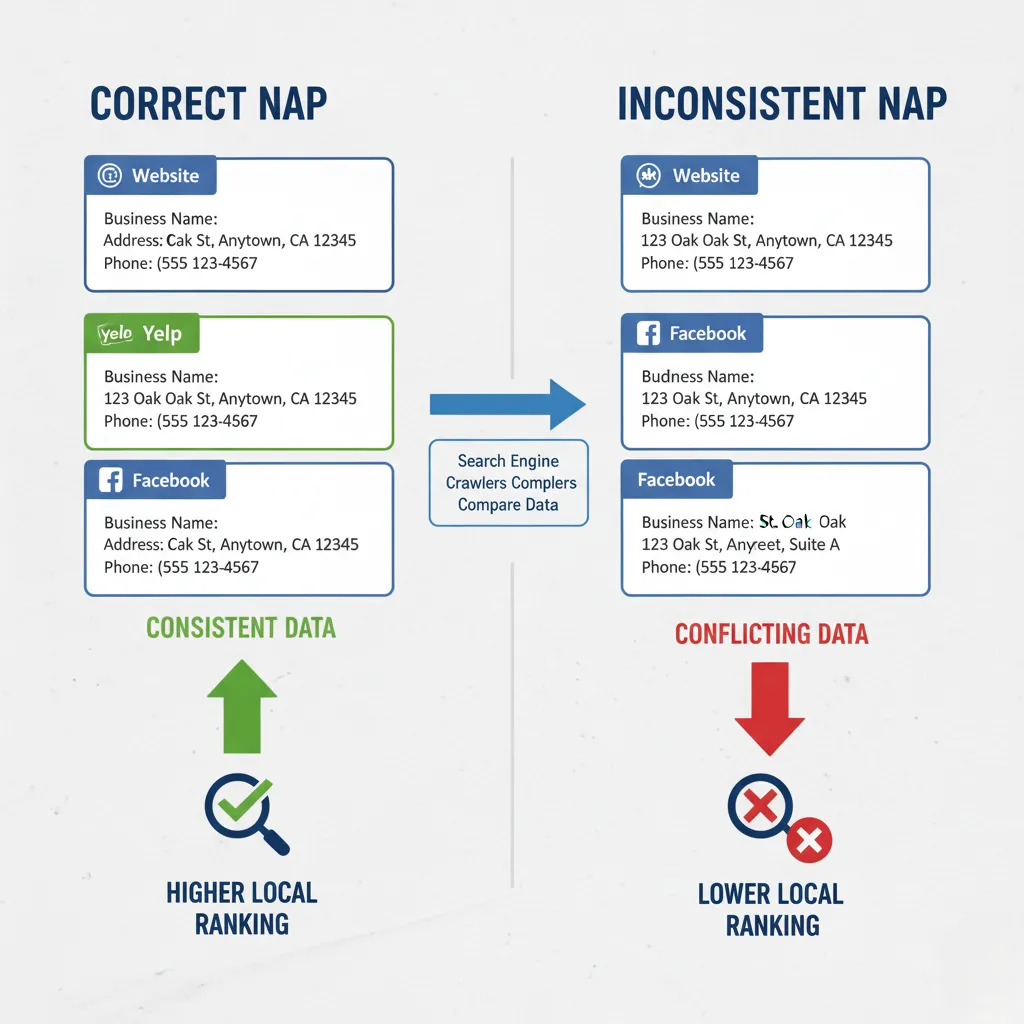
NAP stands for Name, Address, Phone Number.
Search engines are data aggregators. They scan thousands of websites to understand the world. If they see conflicting information about your business, their “confidence score” in your business drops.
- Scenario A: Your website, Yelp, Facebook, and BBB all list “123 Main St, Suite 4.” Google is 100% sure this is correct.
- Scenario B: Your website says “123 Main St.,” Yelp says “123 Main Street #4,” and an old directory says “125 Main St.” Google is confused. Is the address correct? Is the business still there?
When Google is confused, it chooses safety. It will rank a competitor with consistent data above you.
How to Format NAP
Pick one format and stick to it religiously.
- Decide between “St.” and “Street.”
- Decide on “Suite,” “#” or “Ste.”
- Ensure your phone number is local. Toll-free (800) numbers are less effective at building local trust than local area codes.
Audit Your NAP
Search for your phone number in Google (use quotes: “555-0199”). See what listings come up. If you see old addresses or wrong names, note them down for cleanup.
Local Citations & Directories
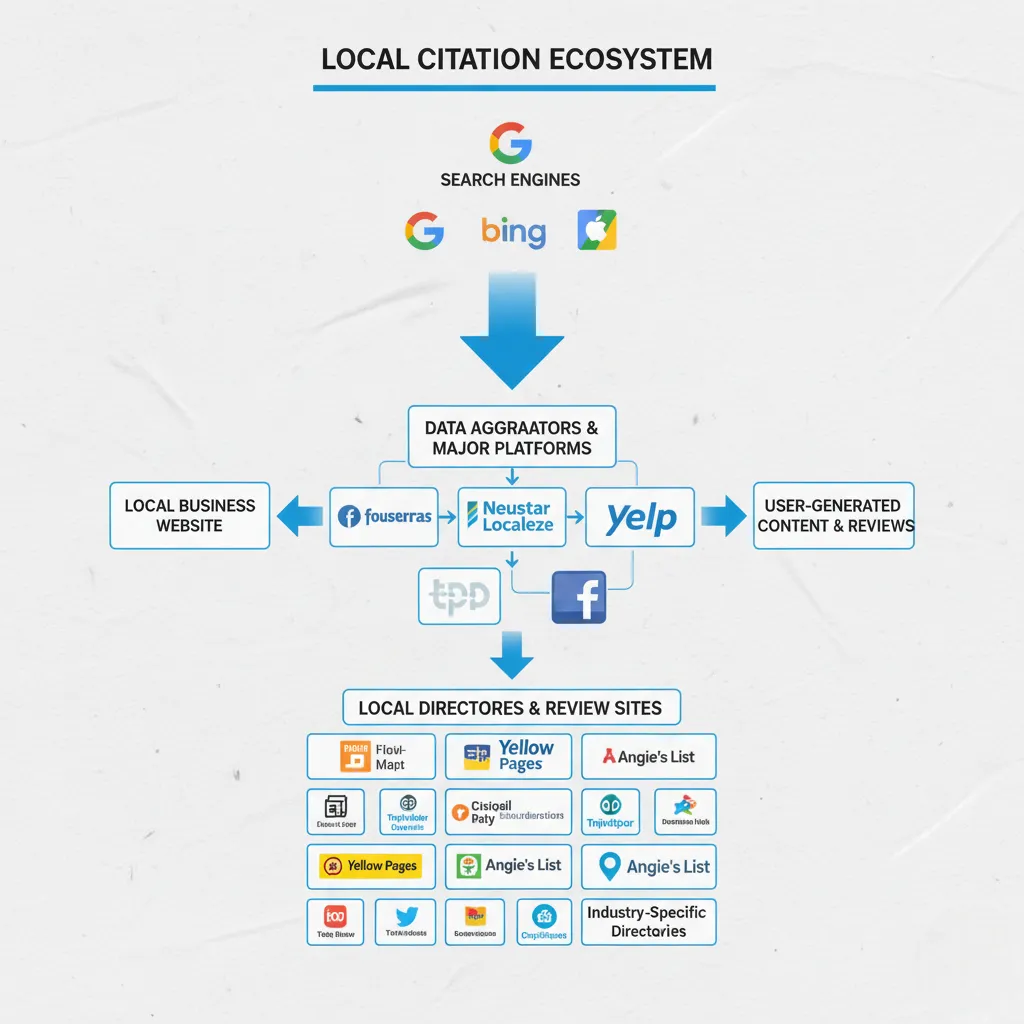
Citations are mentions of your NAP on other websites. They act as foundational links.
Types of Citations
- Core Data Aggregators: These are the big data hubs (such as Foursquare, Data Axle, and Neustar) that feed data to smaller directories. Getting listed here is efficient.
- Tier 1 Directories: Yelp, Facebook, YellowPages, Bing Places, Apple Maps. These have high domain authority and actual human traffic.
- Niche Directories: TripAdvisor (travel), Houzz (home services), Avvo (legal), HealthGrades (medical). These are highly relevant and valuable.
- Local Directories: The local Chamber of Commerce, a neighborhood business association, or a local news site.
Quality Over Quantity
Five years ago, SEOs would build 500 citations on low-quality web directories. This is now a waste of time and can even look spammy. Focus on the top 30-50 high-quality directories. A listing on your local Chamber of Commerce website is worth 100 listings on generic “web-directory-usa.com” sites.
Localized Content Strategy
Your website needs to prove to Google that you are part of the local community. Standard blog posts aren’t enough. You need localized content.
The “Location Page” Strategy
If you serve five different cities, you need a landing page for each one.
- URL Structure: domain.com/locations/city-name
- Content: Do not just copy-paste the text and swap the city name. That is “doorway page” spam.
- Make it unique: Talk about specific projects you did in that city. Mention local landmarks. Embed a Google Map of that particular area. Feature reviews from customers in that city.
Local Blogging
Write content that only a local would care about.
- “The Best Venues for a Wedding in [City]” (If you are a photographer).
- “How [City] Water Hardness Affects Your Pipes” (If you are a plumber).
- “Guide to [City] Summer Festivals” (Great for general local relevance).
This content attracts local traffic. Even if they aren’t buying immediately, you can retarget them later and build topical authority in that geographic area.
Local Link Building: The Authority Booster
This is often the most challenging part, but it yields the highest ROI. You need other local websites to link to yours.
Why Local Links Matter
A link from a massive site like Forbes is excellent for general power. But a link from a small local church website is often better for Local SEO because it confirms your location. It tells Google, “Other entities trust this business in this specific town.”
Actionable Strategies
- Sponsorships: Sponsor a Little League team, a 5k charity run, or a high school theater production. They almost always have a “Sponsors” page with links.
- Local News: Do something newsworthy. Host a free workshop, donate services to a veteran, or run a scholarship. Local news sites are hungry for positive community stories.
- Partner Exchanges: If you are a realtor, you know mortgage brokers, home inspectors, and movers. Create a “Preferred Partners” page and ask them to do the same.
- Unlinked Mentions: Search for your business name on Google. If a local blogger mentioned you but didn’t link, email them and politely ask for the link.
Reviews & Reputation Signals
Reviews are not just a conversion factor; they are a ranking factor. A steady stream of fresh, positive reviews signals to Google that you are open for business and that you are satisfying customers.
The Metrics that Matter
- Quantity: You need a baseline number to be competitive.
- Velocity: Are you consistently getting reviews? Ten reviews this month are better than 100 reviews from three years ago.
- Diversity: Do you have reviews on Google, Facebook, and Yelp? (Focus on Google first, but don’t ignore the others.)
- Keywords: When customers write reviews like “The remodel completely transformed our home,” it helps your business rank for terms like “kitchen remodel” and “home remodeling.”
How to Get More Reviews
Ask. It is that simple. But ask at the right time. The best time to ask is the moment the value is delivered.
- Automation: Use software that sends a text message with a direct link to the Google review form immediately after a service is completed.
- QR Codes: Put one on your business card or at your front counter.
- Follow-up: If they don’t respond to the first request, send a gentle reminder.
Responding is Mandatory
You must respond to every review.
- Positive: “Thanks, Sarah! Glad you loved the patio installation.” (Reinforces the service).
- Negative: Keep it cool. “I’m sorry you had this experience. We want to fix it. Please call us at [Number].”
- Why? You are not replying to the angry customer; you are replying for the 100 future customers who will read that bad review. If you look professional and reasonable, the bad review loses its power.
Behavioral Signals: User Interaction
Google watches how people interact with your listing. If you rank #1 but nobody clicks, you won’t stay #1 for long.
Click-Through Rate (CTR)
Does your listing look enticing?
- Main Photo: Is it high quality?
- Rating: Is it 4.0 or higher?
- Title: Is it clear?
“Pogo-Sticking”
If a user clicks your website link, waits 5 seconds for it to load, gets frustrated, and hits “Back” to click a competitor, that is a strong negative signal.
Fix
Ensure your mobile site loads instantly. Ensure your phone number is clickable (click-to-call).
Driving Directions
When someone hits “Directions” on Maps, it is a massive signal of intent. Ensure your pin placement on the map is accurate so people actually arrive at your door.
Essential Tools for Local SEO
You can manage Local SEO manually, but using the right tools saves time and gives you insights you can’t get on your own. Tools help you track rankings, find the right keywords, monitor reviews, and see how your business compares to competitors in your area. They can also identify errors on your website, highlight opportunities to improve your Google Business Profile, and show which pages or posts bring the most local traffic.
Using these tools makes it easier to make smarter decisions, stay organized, and focus on actions that actually drive customers to your business.
| Tool | Purpose | Why Use It |
|---|---|---|
| Google Business Profile | Management | The dashboard for your listing. Essential and free. |
| Google Search Console | Analytics | See what keywords are driving impressions and clicks. |
| Whitespark / BrightLocal | Rank Tracking | Track your rankings in specific zip codes. |
| Local Falcon / Geogrid | Grid Tracking | See a visual map of your rankings block by block. |
| Moz Local / Yext | Listings Mgmt | Push your NAP data to major aggregators. |
| GatherUp / BirdEye | Reviews | Automate review requests and monitoring. |
Expert Tip
Use a “Grid Tracker” like Local Falcon. Standard rank trackers only check one location (usually the city center). A grid tracker shows you that you rank #1 at your office, but #8 three miles away. This insight tells you exactly where to focus your efforts.
Local SEO Audit Steps: How to Check Your Health
Before you spend money on marketing, audit your current standing.
- The Incognito Search: Open an incognito window. Search for your main keywords. Where do you show up? Note: This is an approximation, as Google still sees your IP address.
- NAP Check: Pick 3-5 major directories. Is your name and address identical on all of them?
- Website Audit:
- Is your address in the footer?
- Is your phone number clickable on mobile?
- Does the homepage load in under 3 seconds?
- Competitor Benchmark: Look at the business ranking #1.
- How many reviews do they have?
- How many photos?
- What categories are they using? This is your target. You don’t need to be perfect; you just need to be better than them.
- Link Audit: Use a tool like Ahrefs or Moz to check for toxic links and identify any obvious local links your competitors have.
Expert Tip
Always approach your Local SEO audit with a competitor mindset. Your goal isn’t perfection, it’s advantage. Focus on minor improvements that move you forward, such as adding missing categories, optimizing load speed, or increasing review engagement. Regularly repeating the audit ensures you stay ahead as local search trends and competitors evolve.
The Future of Local Search: Voice and AI
Search is changing as more people use voice assistants like Siri, Alexa, and Google Assistant to ask, “Who is the best [service] near me?” These devices pull results primarily from the Local Pack, the top three listings on Google Maps. If you’re not there, voice search may skip your business entirely.
Similarly, AI summaries, like Google’s SGE, rely on consistent information and positive reviews across multiple sites. The more your business is recognized and well-rated online, the more likely it is to be recommended to nearby customers.
Key Takeaway
The strategies for Voice and AI search are the same as standard Local SEO, but the bar for accuracy is higher. Structured data (Schema markup) helps these robots better understand your content.
Putting Your Local Strategy into Action
Dominating local search is not about knowing one secret trick. It is about execution. It is about ensuring your business data is accurate, your reputation is stellar, and your website is helpful.
Start with the basics. Claim your profile. Fix your address. Ask your next customer for a review. These small actions compound over time.
Remember, the goal is not just to rank higher. The goal is to be the obvious choice when a customer in your neighborhood needs your help. When you combine high visibility with high trust, you win the market.
Need Expert Guidance?
Local SEO requires constant vigilance. The rules change, competitors adapt, and maintaining your digital reputation takes time you might prefer to spend running your business.
If you are ready to stop guessing and start dominating your local market, Genius Marketing is prepared to partner with you. We build custom strategies that turn searchers into loyal customers.
Genius Marketing Phone: (360) 519-5100
Frequently Asked Questions
Can small businesses compete with big brands in local search?
Yes. Local SEO favors consistency, relevance, and accurate information over budget size. Small businesses can outrank larger chains by staying active, posting updates, gathering reviews, and keeping their profiles up to date.
Should I optimize my website for local searches?
Yes. Include your city or neighborhood in page titles, headings, and content. Make sure your contact info is easy to find and add a map. This helps search engines connect you with local customers.
Does social media help with local SEO?
Indirectly, yes. Social media increases visibility, engagement, and brand awareness. Linking your social pages to your website and Google Profile can support your SEO efforts and drive more local traffic.
How do I track if local SEO is working?
Look at calls, website visits, Google Profile views, and direction requests to your location. Track which pages or posts bring the most attention. This helps you focus on what actually attracts customers.
My business is located in City A, but I want to rank in City B. How can I do that?
This is the most complex challenge. Since you lack a physical address in City B, you won’t appear in the Map Pack there. You must rely on “Local Organic” results. Build a dedicated “City B” landing page on your site, get links from City B websites, and mention City B in your content.
Sources
- BrightLocal – Annual Local Consumer Review Survey provides data on consumer behavior toward local businesses.
- Moz – The “State of Local SEO” report detailing the weighting of ranking factors like proximity and reviews.
- Google Business Profile Help – Official guidelines on how photos and media impact business listing performance.
- Google Search Central – Documentation on LocalBusiness structured data (Schema) implementation.
- Whitespark – Expert survey data on the changing importance of citations and behavioral signals.